Table of Contents
ToggleWhether you’re knee-deep in a home addition or dealing with a vacant property between tenants, keeping eyes on your investment matters. Mobile security camera towers have moved beyond commercial job sites and into the residential rental market, and for good reason. These self-contained surveillance units offer temporary, relocatable monitoring without running conduit or pulling permits for permanent installations. They’re solar-powered, wireless, and surprisingly affordable for short-term needs. This guide walks through what homeowners need to know about renting one, from understanding the technology to comparing quotes and handling setup.
Key Takeaways
- Mobile security camera tower rentals offer temporary, relocatable surveillance for home renovations and vacant properties without requiring permanent installation or electrical infrastructure.
- Rental costs typically range from $150–$500 per month depending on equipment specs and monitoring options, with additional delivery fees ($100–$300) and optional managed monitoring services ($50–$200 monthly).
- PTZ cameras with 30x zoom and 1080p to 4K resolution mounted on 10–30 foot towers can monitor single-family properties via 4G/5G cellular networks with three to seven days of solar battery autonomy.
- Proper site preparation—including level terrain, southern solar exposure, utility marking, and unobstructed sight lines—is critical for reliable tower operation and must be confirmed before delivery.
- Mobile security camera tower rentals typically require 30-day minimums, with contracts including cloud storage and remote access software, though you should purchase damage waivers and verify your homeowner’s insurance coverage.
What Is a Mobile Security Camera Tower and How Does It Work?
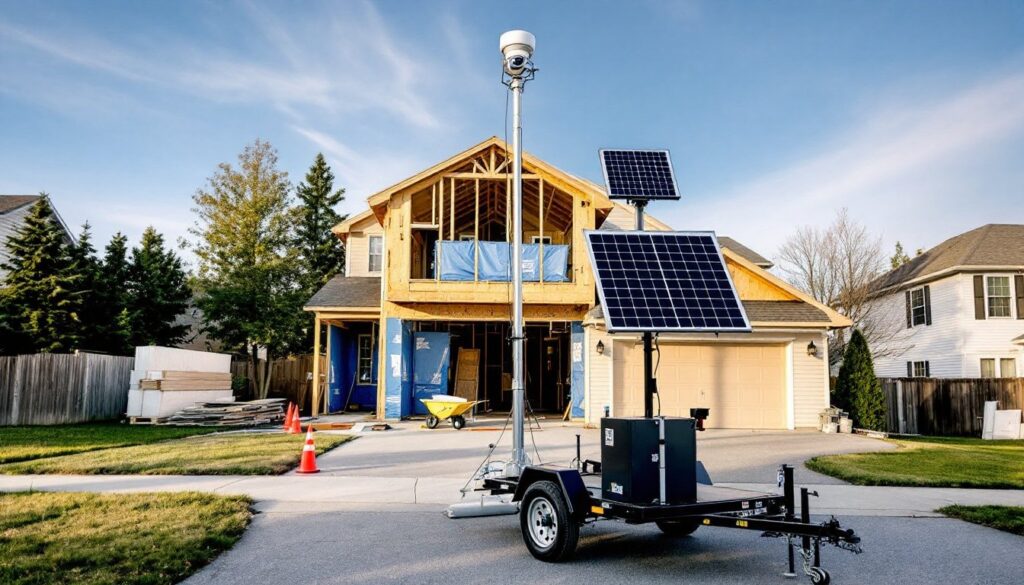
A mobile security camera tower is a self-contained surveillance system mounted on a wheeled trailer or standalone mast, typically ranging from 10 to 30 feet in height. Unlike permanent security cameras that require hardwired power and network connections, these units integrate everything onboard: cameras, solar panels, battery banks, wireless transmission equipment, and sometimes lighting or sirens.
Most rental towers use pan-tilt-zoom (PTZ) cameras with 360-degree rotation and optical zoom ranging from 20x to 40x magnification. Image quality typically sits at 1080p to 4K resolution, with infrared night vision effective to 300 feet or more. Video feeds transmit via 4G LTE or 5G cellular networks, so there’s no need for existing Wi-Fi infrastructure. The homeowner or security company monitors footage through cloud-based platforms accessible from any smartphone or computer.
Power comes from solar panels (usually 100–400 watts) that charge deep-cycle battery banks capable of running the system three to seven days without sunlight. Some units include backup propane or diesel generators for extended cloudy periods or high-traffic monitoring scenarios. The entire rig typically fits on a single-axle trailer with a standard 2-inch ball hitch, so you can tow it with most pickup trucks or SUVs, though rental companies often deliver and position the unit as part of the service.
Setup requires a relatively flat surface with good solar exposure and unobstructed sight lines to monitored areas. The mast telescopes or cranks to full height and locks in place. No trenching, no drilling into your fascia, no voltage calculations. When the rental period ends, the company hauls it away.
When Should You Consider Renting a Mobile Security Camera Tower?
Renting makes sense when you need temporary, high-visibility surveillance that doesn’t justify permanent infrastructure. Here are the scenarios where homeowners get the most value.
Home Renovation and Construction Projects
Open walls, material deliveries, and contractor access create theft and liability risks. Copper pipe, power tools, appliances, and lumber all vanish from job sites, even residential ones. A visible security tower discourages opportunistic theft and provides documentation if disputes arise over work quality or timeline.
For projects lasting two to six months, rental towers cost less than installing and later removing a hardwired system. They’re especially useful during foundation work, framing, or exterior renovations when the existing home security system is offline or inaccessible. Many project cost guides recommend budgeting 1–2% of total renovation costs for site security on larger jobs.
Position the tower to cover entry points, material storage areas, and high-value equipment. If your build requires overnight concrete pours or other after-hours work, the tower documents contractor activity and protects against claims of damage or incomplete work.
Temporary Property Monitoring and Vacant Homes
Vacant homes attract vandalism, squatters, and metal thieves targeting HVAC units and wiring. If you’re between tenants, listing a property for sale, or waiting on estate proceedings, a mobile tower provides round-the-clock monitoring without requiring interior access or functioning electrical service.
Insurance companies sometimes require active monitoring for vacant properties to maintain coverage, check your policy. A documented security system may also reduce premiums or satisfy underwriting requirements for homes left unoccupied beyond 30–60 days.
Other temporary monitoring scenarios include:
- Storm damage assessment: Document wind, water, or falling debris in real time for insurance claims
- Boundary disputes: Record encroachment or trespassing when neighbor issues escalate
- Outdoor event security: Weddings, estate sales, or large gatherings on your property
- Seasonal property protection: Monitoring vacation homes, hunting cabins, or rural acreage during off-season months
How to Choose the Right Mobile Security Camera Tower Rental
Not all towers suit residential use. Commercial units designed for construction sites or parking lots often include features homeowners don’t need, and costs they shouldn’t pay. Here’s how to match specs to your situation.
Camera coverage and resolution: For single-family properties under one acre, a single PTZ camera with 30x zoom typically covers the entire lot. Larger properties or multi-building sites may need dual-camera towers. Confirm the resolution, 1080p minimum, and ask about night vision range. Infrared effective to 200 feet handles most residential lots: thermal imaging is overkill unless you’re monitoring acreage for wildlife or trespassers at extreme distances.
Power autonomy: Solar-only systems work in most regions if the panel gets five hours of direct sun daily. Properties with heavy tree cover or northern exposures may need hybrid solar/generator models. Ask about battery runtime during overcast periods, three days minimum gives you cushion through storm systems.
Monitoring options: Decide between self-monitoring (you watch live feeds and recorded clips) and managed monitoring (the rental company or third-party service watches feeds and alerts you to activity). Self-monitoring costs less but requires diligence. Managed services add $50–$200 per month but provide 24/7 professional oversight and faster emergency response. Some platforms use AI motion detection to filter out animals, shadows, and passing vehicles, reducing false alerts.
Mobility and placement: Trailer-mounted units offer easy repositioning as your needs change, useful during phased renovations. Standalone masts stay put but often cost less and work on smaller lots where a trailer footprint won’t fit. Measure your available space: trailers need roughly 6×12 feet, while masts need a 4×4-foot base plus stabilization area.
Cellular connectivity: Verify that the tower’s carrier has strong signal at your property. Request a site survey or signal test before committing, poor connectivity kills the whole system. Some companies offer multi-carrier units that switch between networks automatically.
Compliance and permits: In most residential zones, temporary surveillance towers don’t require permits if they’re on private property and under 35 feet. Verify local zoning rules, especially in HOA-governed neighborhoods or historic districts. If your tower will be visible from the street, check for height restrictions or aesthetic covenants.
What to Expect: Rental Costs and Contract Terms
Mobile security tower rentals for residential use typically run $150 to $500 per month, depending on equipment specs, monitoring services, and regional market rates. Here’s the cost breakdown.
Base rental fees: Basic solar-powered towers with single PTZ cameras and self-monitoring start around $150–$250 per month. Dual-camera models, generator backup, or premium resolution push rates to $300–$500 monthly. These rates usually include the equipment, cellular data plan, cloud storage (7–30 days of footage), and remote access software.
Delivery, setup, and removal: Expect $100–$300 each way for delivery and takedown. Some companies waive these fees for rentals exceeding three months. If you’re towing the unit yourself, rental rates drop $50–$100 per month, but you’ll handle leveling, mast deployment, and aiming the cameras, not difficult, but time-consuming.
Managed monitoring services: Professional monitoring adds $50–$200 per month. Entry-level plans provide business-hours review and email alerts. Premium services offer 24/7 live monitoring, instant text/call alerts, and coordination with local law enforcement or private security response. When comparing contractor services, ask whether monitoring includes incident reports and video evidence packages for insurance or legal use.
Deposits and insurance: Security deposits range from $500 to $1,500, refundable if the equipment returns undamaged. Some companies require proof of homeowner’s insurance or offer damage waiver coverage for $20–$40 per month. Read the contract carefully, you’re typically liable for theft, vandalism, or weather damage unless you purchase the waiver.
Minimum rental periods: Most contracts require 30-day minimums, with discounts kicking in at 90 days or longer. Month-to-month terms offer flexibility but cost more per month than three- or six-month commitments. Avoid contracts with auto-renewal clauses unless you’re confident about project timelines.
Regional and seasonal pricing: Urban areas with established security rental markets see lower rates due to competition. Rural or remote properties may face surcharges for delivery distance. Demand spikes during hurricane season (coastal regions) and wildfire season (western states), so book early if your project overlaps peak periods.
Installation and Setup Process for Homeowners
Most rental companies handle delivery and setup, but understanding the process helps you prepare the site and troubleshoot issues.
Site preparation: Clear a level area with compacted soil or paved surface. The tower needs stable footing, soft ground or slopes cause tipping. For trailer units, ensure the hitch is accessible and the area allows the tow vehicle to maneuver. Mark underground utilities before the rental company arrives: call 811 for free locating service. Solar panels need southern exposure (northern hemisphere) with minimal shade from 9 a.m. to 3 p.m., this is non-negotiable for reliable operation.
Delivery and positioning: The rental company typically arrives with a truck or trailer, backs the unit into position, and deploys stabilizer jacks or outriggers. They’ll crank or winch the mast to full height and lock it. This takes 30–60 minutes for experienced crews. Ask them to walk you through emergency lowering procedures in case of high winds, most masts can be dropped quickly using a manual crank or release mechanism.
Camera aiming and configuration: Technicians aim the PTZ camera and configure motion detection zones through the software platform. Be present during this step and request test views of critical areas, entry doors, driveways, material storage, and property boundaries. Adjust detection sensitivity to avoid false alarms from tree branches, passing traffic, or neighborhood pets.
User access and training: You’ll receive login credentials for the monitoring platform (web and mobile app). Learn how to review recorded clips, download footage, adjust motion zones, and contact support. Test the system thoroughly during the first 24 hours, cell signal can fluctuate, and it’s easier to reposition the tower early than after a week.
Maintenance and monitoring: Solar panels need occasional cleaning, dust, pollen, and bird droppings reduce efficiency. A quick spray with a hose every two weeks maintains performance. Check battery status weekly through the app: if capacity drops unexpectedly, contact the rental company for service. Most contracts include maintenance visits, but response times vary.
Takedown and return: When the rental ends, the company reverses the process: lowers the mast, retracts stabilizers, and hauls the unit away. Walk the site with the technician to confirm no damage occurred, this protects your deposit. Download and archive any footage you need for records before they deactivate your account, as many home service providers note that cloud storage typically purges within 7–14 days after contract termination.
Safety notes: Wear gloves when handling the trailer hitch or stabilizer cranks, pinch points abound. If you’re self-installing, use a spotter when raising the mast near overhead power lines: maintain at least 10 feet of clearance from any electrical conductors. Never climb the tower or attempt repairs yourself, that voids the contract and risks serious injury.